

Quality CKA PDF Dumps - CKA Exam Questions
Most UptoDate Linux Foundation CKA Exam Dumps PDF 2024
The CKA certification exam is a hands-on test that requires candidates to perform Kubernetes administration tasks using a command line interface. CKA exam evaluates the candidate's ability to deploy and manage Kubernetes clusters, configure networking, and implement security policies. It also tests their knowledge of Kubernetes architecture, troubleshooting, and best practices. CKA exam is challenging and requires extensive preparation and practice to pass. However, passing the CKA certification exam can significantly enhance the career prospects of Kubernetes professionals, as it is a widely recognized credential in the industry.
NEW QUESTION # 29
Get list of persistent volumes and persistent volume claim in the cluster
Answer:
Explanation:
kubectl get pv kubectl get pvc
NEW QUESTION # 30
Change the Image version to 1.15-alpine for the pod you just created and verify the image version is updated.
- A. Kubect1 set image pod/nginx nginx=nginx:1.15-alpine
kubect1 describe po nginx
// another way it will open vi editor and change the version
kubect1 describe po nginx - B. Kubect1 set image pod/nginx nginx=nginx:1.15-alpine
kubect1 describe po nginx
// another way it will open vi editor and change the version
kubeclt edit po nginx
kubect1 describe po nginx
Answer: B
NEW QUESTION # 31
Create an nginx pod which loads the secret as environment variables
- A. // create a yml file
kubectl run nginx --image=nginx --restart=Never --dry-run -o
yaml > nginx.yml
// add env section below and create
vim nginx.yaml
apiVersion: v1
kind: Pod
metadata:
labels:
run: nginx
name: nginx
spec:
containers:
- image: nginx
name: nginx
envFrom:
- secretRef:
name: my-secret
restartPolicy: Never
kubectl apply -f nginx.yaml
//verify
kubectl exec -it nginx - env - B. // create a yml file
kubectl run nginx --image=nginx --restart=Never --dry-run -o
yaml > nginx.yml
// add env section below and create
vim nginx.yaml
run: nginx
name: nginx
spec:
containers:
- image: nginx
name: nginx
envFrom:
- secretRef:
name: my-secret
restartPolicy: Never
kubectl apply -f nginx.yaml
//verify
kubectl exec -it nginx - env
Answer: A
NEW QUESTION # 32
Change the Image version back to 1.17.1 for the pod you just updated and observe the changes
Answer:
Explanation:
kubectl set image pod/nginx nginx=nginx:1.17.1 kubectl describe po nginx kubectl get po nginx -w # watch it
NEW QUESTION # 33
Create a pod that having 3 containers in it? (Multi-Container)
- A. image=nginx, image=redis, image=consul
Name nginx container as "nginx-container"
Name redis container as "redis-container"
Name consul container as "consul-container"
Create a pod manifest file for a container and append container
section for rest of the images
kubectl run multi-container --generator=run-pod/v1 --image=nginx --
dry-run -o yaml > multi-container.yaml
# then
vim multi-container.yaml
labels:
run: multi-container
name: multi-container
spec:
containers:
- image: nginx
name: nginx-container
- image: redis
name: consul-container
restartPolicy: Always - B. image=nginx, image=redis, image=consul
Name nginx container as "nginx-container"
Name redis container as "redis-container"
Name consul container as "consul-container"
Create a pod manifest file for a container and append container
section for rest of the images
kubectl run multi-container --generator=run-pod/v1 --image=nginx --
dry-run -o yaml > multi-container.yaml
# then
vim multi-container.yaml
apiVersion: v1
kind: Pod
metadata:
labels:
run: multi-container
name: multi-container
spec:
containers:
- image: nginx
name: nginx-container
- image: redis
name: redis-container
- image: consul
name: consul-container
restartPolicy: Always
Answer: B
NEW QUESTION # 34
Create 5 nginx pods in which two of them is labeled env=prod and
three of them is labeled env=dev
- A. kubectl run nginx-dev1 --image=nginx --restart=Never --
labels=env=dev
kubectl run nginx-dev2 --image=nginx --restart=Never --
labels=env=dev
kubectl run nginx-dev3 --image=nginx --restart=Never --
labels=env=dev
kubectl run nginx-prod1 --image=nginx --restart=Never --
labels=env=prod
kubectl run nginx-prod2 --image=nginx --restart=Never --
labels=env=prod - B. kubectl run nginx-dev1 --image=nginx --restart=Never --
labels=env=dev
kubectl run nginx-dev2 --image=nginx --restart=Never --
labels=env=dev
kubectl run nginx-prod1 --image=nginx --restart=Never --
labels=env=prod
kubectl run nginx-prod2 --image=nginx --restart=Never --
labels=env=prod
Answer: A
NEW QUESTION # 35
Create a pod with image nginx called nginx and allow traffic on port 80
Answer:
Explanation:
kubectl run nginx --image=nginx --restart=Never --port=80
NEW QUESTION # 36
Create the service as type NodePort with the port 32767 for the nginx pod with the pod selector app: my-nginx
Answer:
Explanation:
kubectl run nginx --image=nginx --restart=Never -- labels=app=nginx --port=80 --dry-run -o yaml > nginx-pod.yaml
NEW QUESTION # 37
List all persistent volumes sorted by capacity, saving the full kubectl output to /opt/KUCC00102/volume_list. Use kubectl 's own functionality for sorting the output, and do not manipulate it any further.
Answer:
Explanation:
solution
NEW QUESTION # 38
An Administrator is configuring Authentication Enforcement and they would like to create an exemption rule to exempt a specific group from authentication. Which authentication enforcement object should they select?
- A. default-no-captive-port
- B. default-browser-challenge
- C. default-web-form
- D. default-authentication-bypass
Answer: A
NEW QUESTION # 39
Create a namespace called 'development' and a pod with image nginx called nginx on this namespace.
Answer:
Explanation:
See the solution below.
Explanation
kubectl create namespace development
kubectl run nginx --image=nginx --restart=Never -n development
NEW QUESTION # 40
Perform the following tasks:
Add an init container to hungry-bear defined in spec file
/opt/KUCC00108/pod-spec-KUC
The init container should create /workdir/calm.txt
If /workdir/calm.txt is not
Once the spec file has been definition, the pod should be created
Answer:
Explanation:
See the solution below.
Explanation
solution
F:\Work\Data Entry Work\Data Entry\20200827\CKA\4 B.JPG
F:\Work\Data Entry Work\Data Entry\20200827\CKA\4 C.JPG
F:\Work\Data Entry Work\Data Entry\20200827\CKA\4 D.JPG
NEW QUESTION # 41
For this item, you will have to ssh to the nodes ik8s-master-0 and ik8s-node-0 and complete all tasks on these nodes. Ensure that you return to the base node (hostname: node-1) when you have completed this item.
Context
As an administrator of a small development team, you have been asked to set up a Kubernetes cluster to test the viability of a new application.
Task
You must use kubeadm to perform this task. Any kubeadm invocations will require the use of the
--ignore-preflight-errors=all option.
* Configure the node ik8s-master-O as a master node. .
* Join the node ik8s-node-o to the cluster.
Answer:
Explanation:
See the solution below.
Explanation
solution
You must use the kubeadm configuration file located at /etc/kubeadm.conf when initializingyour cluster.
You may use any CNI plugin to complete this task, but if you don't have your favourite CNI plugin's manifest URL at hand, Calico is one popular option: https://docs.projectcalico.org/v3.14/manifests/calico.yaml Docker is already installed on both nodes and has been configured so that you can install the required tools.
NEW QUESTION # 42
Get list of all pods in all namespaces and write it to file "/opt/pods-list.yaml"
Answer:
Explanation:
kubectl get po -all-namespaces > /opt/pods-list.yaml
NEW QUESTION # 43
Print all pod name and all image name and write it to a file
name "/opt/pod-details.txt"
Answer:
Explanation:
kubectl get pods -o=custom-columns='Pod Name:metadata.name','Image:spec.containers[*].image' > /opt/pod-details.txt
NEW QUESTION # 44
Create a NetworkPolicy which denies all ingress traffic
- A. apiVersion: networking.k8s.io/v1
kind: NetworkPolicy
metadata:
name: default-deny
spec:
podSelector: {}
policyTypes:
- Ingress - B. apiVersion: networking.k8s.io/v1
kind: NetworkPolicy
metadata:
name: default-deny
spec:
podSelector: ()
policyTypes:
- Ingress
Answer: A
NEW QUESTION # 45
Create a pod as follows:
* Name:mongo
* Using Image:mongo
* In anew Kubernetes namespacenamed:my-website
Answer:
Explanation:
See the solution below.
Explanation
solution
NEW QUESTION # 46
Create an nginx pod and list the pod with different levels of verbosity
- A. // create a pod
kubectl run nginx --image=nginx --restart=Never --port=80
// List the pod with different verbosity
kubectl get po nginx --v=7
kubectl get po nginx --v=8
kubectl get po nginx --v=9 - B. // create a pod
kubectl run nginx --image=nginx --restart=Never --port=80
// List the pod with different verbosity
kubectl get po nginx --v=7
kubectl get po nginx --v=6
kubectl get po nginx --v=9
Answer: A
NEW QUESTION # 47
Create an nginx pod and list the pod with different levels of verbosity
Answer:
Explanation:
See the solution below.
Explanation
// create a pod
kubectl run nginx --image=nginx --restart=Never --port=80
// List the pod with different verbosity
kubectl get po nginx --v=7
kubectl get po nginx --v=8
kubectl get po nginx --v=9
NEW QUESTION # 48
Create a secret mysecret with values user=myuser and password=mypassword
- A. kubectl create secret generic my-secret --fromliteral=username=user --from-literal=password=mypassword
// Verify
kubectl get secret --all-namespaces
kubectl get secret generic my-secret -o yaml - B. kubectl create secret generic my-secret --fromliteral=username=user --from-literal=password=mypassword
// Verify
kubectl get secret generic my-secret -o yaml
Answer: A
NEW QUESTION # 49
Create a Kubernetes secret as follows:
Name: super-secret
password: bob
Create a pod named pod-secrets-via-file, using the redis Image, which mounts a secret named super-secret at
/secrets.
Create a second pod named pod-secrets-via-env, using the redis Image, which exports password as CONFIDENTIAL
Answer:
Explanation:
See the solution below.
Explanation
solution
F:\Work\Data Entry Work\Data Entry\20200827\CKA\12 B.JPG
F:\Work\Data Entry Work\Data Entry\20200827\CKA\12 C.JPG
F:\Work\Data Entry Work\Data Entry\20200827\CKA\12 D.JPG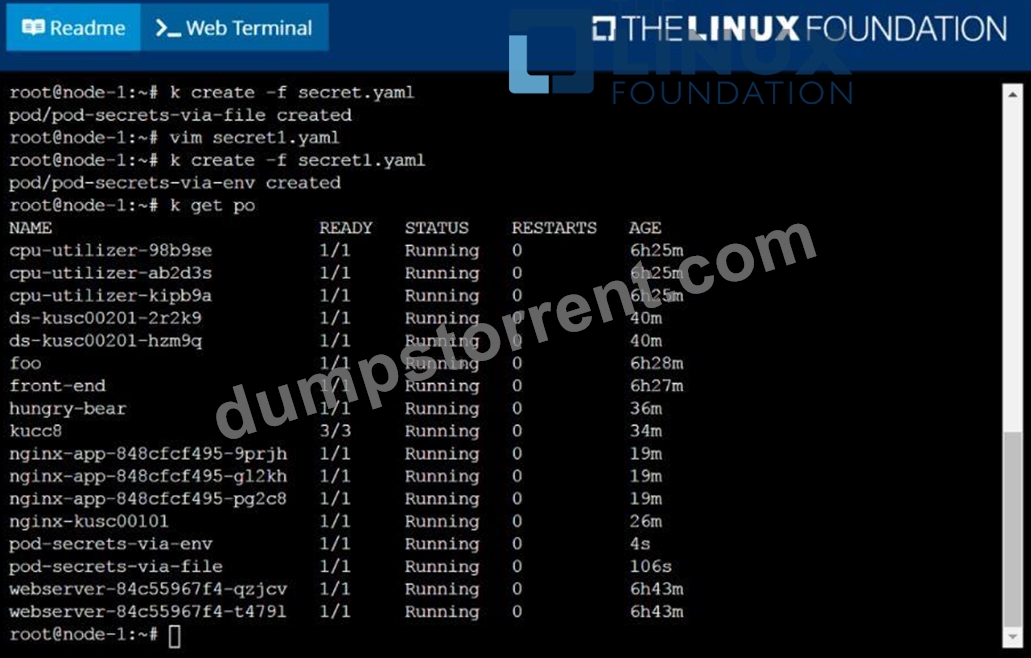
NEW QUESTION # 50
Update the deployment with the image version 1.17.4 and verify
- A. kubectl set image deploy/webapp nginx=nginx:1.17.4
//Verify
kubectl describe deploy webapp | grep Image
kubectl get deploy -o=jsonpath='{range.items [*]}{.[*]}
{.metadata.name}{"\t"}{.spec.template.spec.containers[*].i
mage}{"\n"}' - B. kubectl set image deploy/webapp nginx=nginx:1.17.4
//Verify
kubectl describe deploy webapp | grep Image
kubectl get deploy -
{.metadata.name}{"\t"}{.spec.template.spec.containers[*].i
mage}{"\n"}'
Answer: A
NEW QUESTION # 51
List the nginx pod with custom columns POD_NAME and POD_STATUS
Answer:
Explanation:
kubectl get po -o=custom-columns="POD_NAME:.metadata.name,
POD_STATUS:.status.containerStatuses[].state"
NEW QUESTION # 52
Create a busybox pod which executes this command sleep 3600 with the service account admin and verify
- A. kubectl run busybox --image=busybox --restart=Always --dry-run
-o yaml -- /bin/sh -c "sleep 3600" > busybox.yml
// Edit busybox.yaml file
apiVersion: v1
kind: Pod
metadata:
creationTimestamp: null
labels:
run: busybox
name: busybox
spec:
serviceAccountName: admin
containers:
- args:
- /bin/sh
- -c
- sleep 3600
image: busybox
name: busybox
restartPolicy: Always
// verify
K kubectl describe po busybox - B. kubectl run busybox --image=busybox --restart=Always --dry-run
-o yaml -- /bin/sh -c "sleep 3600" > busybox.yml
// Edit busybox.yaml file
apiVersion: v1
kind: Pod
metadata:
creationTimestamp: null
labels:
run: busybox
name: busybox
spec:
serviceAccountName: admin
containers:
- args:
- /bin/sh
- -c
- sleep 3800
image: busybox
name: busybox
restartPolicy: Always
// verify
K kubectl describe po busybox
Answer: A
NEW QUESTION # 53
......
The CKA certification exam is designed to test the knowledge and skills of candidates in various aspects of Kubernetes administration, such as cluster installation and configuration, application deployment and management, networking, security, and troubleshooting. CKA exam is conducted online and consists of a set of performance-based tasks that require candidates to demonstrate their ability to perform various Kubernetes administration tasks in a time-bound manner.
The Certified Kubernetes Administrator (CKA) Program Certification Exam is an industry-leading certification program offered by the Linux Foundation. Certified Kubernetes Administrator (CKA) Program Exam certification is designed for IT professionals who want to demonstrate their expertise in Kubernetes, an open-source container orchestration platform. Kubernetes has become the de facto standard for container orchestration, and organizations around the world are hiring professionals who are proficient in Kubernetes to manage their containerized workloads.
100% Free Kubernetes Administrator CKA Dumps PDF Demo Cert Guide Cover: https://troytec.dumpstorrent.com/CKA-exam-prep.html